
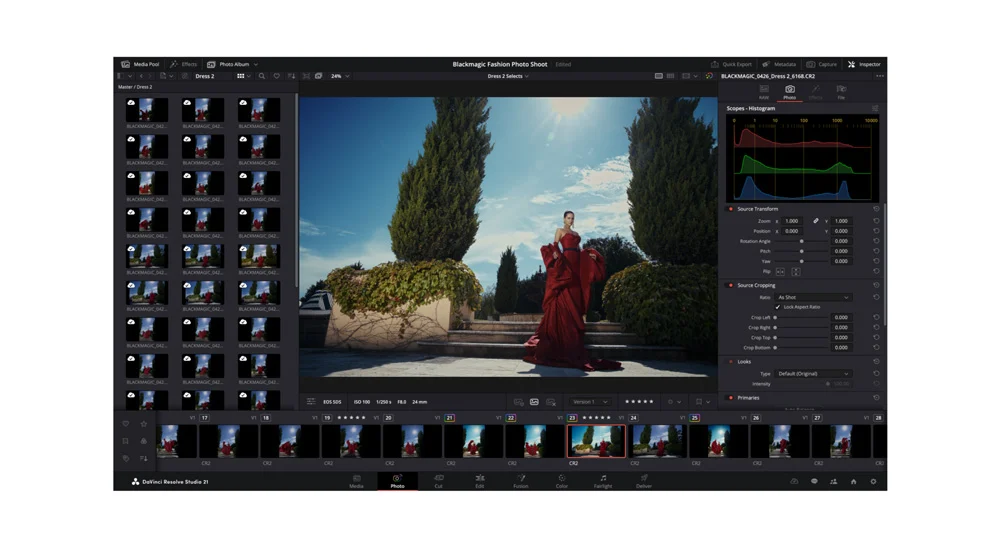
Blackmagic Design has officially launched DaVinci Resolve 21, an enhanced version of its powerful video editing suite. This update introduces a plethora of new features, including a dedicated Photo page, cutting-edge AI tools, improved workflows, and broader camera format support, making it a strong contender for professionals in both video and photography.
A standout feature in DaVinci Resolve 21 is the newly added Photo page, which allows users to edit and organize still images directly within the software. This capability transforms DaVinci Resolve from a primarily video-focused tool to a more comprehensive multimedia editing platform. The Photo page is equipped with album management options, integrations with Lightroom catalogs and Apple Photos, and offers GPU-accelerated batch exports. This integration simplifies the workflow for those who handle both video and photography, enabling seamless transitions between editing formats.
As for the AI capabilities, the software introduces several powerful tools that enhance the editing process. IntelliSearch allows users to quickly locate clips and content, streamlining the search process significantly. Likewise, CineFocus aids in adjusting focus effects intelligently, and portrait enhancement features utilize AI to refine images with minimal manual input. These tools are particularly beneficial for content creators who need to manage large volumes of data, enabling them to focus on the creative aspects rather than getting bogged down in tedious tasks.
Editing professionals will appreciate the new controls for keyframing, along with improvements in subtitle management and timeline comparison tools. Support for Lottie animations and OGraf HTML graphics adds versatility for dynamic video presentations. When it comes to raw image formats, editors won’t be left behind either; the software now supports various formats including Canon CR3, Panasonic RW2, Fujifilm RAF, Apple ProRAW, and Sony ARW, accommodating the most current camera outputs.
In terms of pricing, DaVinci Resolve 21 is available in both a free version and a Studio version priced at $295. The freemium model allows users to experience the core features before making a financial commitment. This structure is an attractive proposition for small and medium-sized businesses (SMBs) that often operate within tight budgets.
When considering the total cost of ownership for DaVinci Resolve 21, SMBs must evaluate their specific needs and anticipated usage. The software’s robust features can lead to significant savings in manual editing time and enhanced productivity, resulting in a positive return on investment (ROI) over three to six months. For instance, if a small production studio typically spends five hours on a basic video edit, the introduction of AI-efficient tools could potentially reduce this time by up to 40%, translating to hundreds of dollars saved per project through streamlined processes.
Switching gears, let’s explore the competitive landscape by comparing DaVinci Resolve 21 with Adobe Premiere Pro, another leading video and photo editing tool. Adobe Premiere Pro is known for its deep integration within the Adobe Creative Cloud ecosystem, which is a boon for users already utilizing Adobe tools like Photoshop and After Effects. The tight integration facilitates a seamless workflow when creating multimedia projects. However, this can also come with higher subscription costs, ranging from $20.99 to $52.99 per month, depending on whether a user opts for individual apps or a full Creative Cloud package.
On reliability, both tools are generally stable, but Adobe Premiere has seen more incidents of performance lags, particularly with extensive plug-ins compared to DaVinci Resolve’s faster processing capabilities, especially when using GPU acceleration in editing and rendering. For instance, a team working in a collaborative environment, constantly sharing files, might find Premiere Pro more cumbersome due to its reliance on cloud services compared to the standalone usability of DaVinci Resolve.
Integrations vary significantly. DaVinci Resolve boasts powerful internal tools, while Premiere Pro’s extensive third-party integration ecosystem stands out. If a user heavily relies on external plug-ins, Premiere may be the better choice. Conversely, for those looking for a comprehensive, all-in-one solution, DaVinci Resolve’s included features may prove to be more beneficial.
When considering limitations, DaVinci Resolve can present a steeper learning curve for some users, particularly those unfamiliar with non-linear video editing software. Adobe, being more established, has a plethora of tutorials and community support that can help new users get up to speed faster. Nevertheless, for professionals seeking advanced features without the overhead of a subscription, DaVinci Resolve is a strong contender.
For SMBs contemplating a migration from their current editing platform to DaVinci Resolve, a low-risk pilot project could involve selecting a smaller project to edit using the new software. This allows teams to familiarize themselves with the interface and features without fully committing. A phased approach—perhaps starting with the free version—can also ease transition anxiety.
FlowMind AI Insight: Choosing the right editing tool hinges on an organization’s unique requirements, budgetary constraints, and team proficiency. DaVinci Resolve 21 offers a compelling mix of features and capabilities that can enhance productivity for SMBs focusing on video and photo editing tasks. Given its one-time purchase model and powerful functionalities, it provides a strong alternative to subscription-based services, ultimately allowing businesses to maximize their resources effectively.
Original article: Read here
2026-06-06 06:13:00