
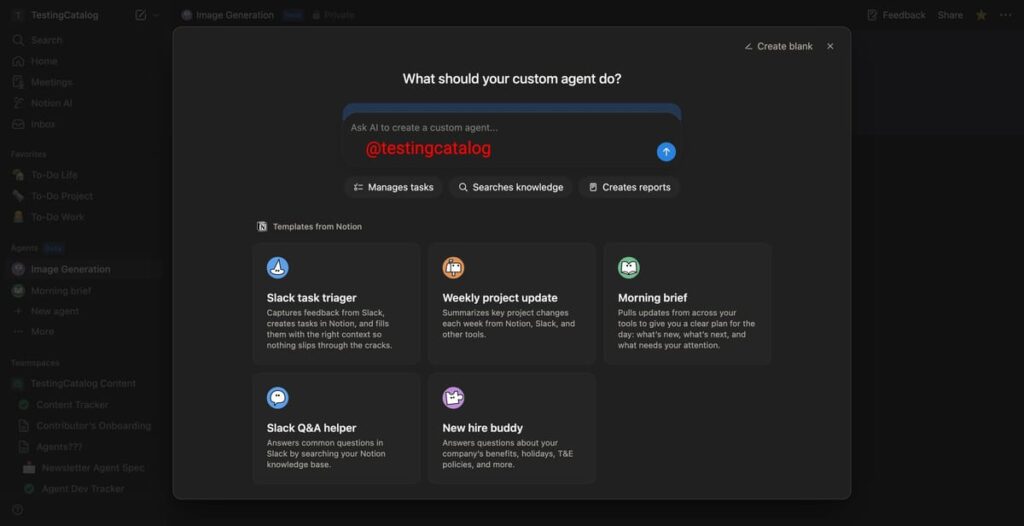
Notion is implementing an exciting new functionality within its AI-first workspace, allowing users to create custom AI-powered agents. This tutorial aims to guide small and mid-size business operations managers—no coding skills required—through the process of designing, deploying, and monitoring a basic automation that leverages this feature.
To begin, ensure that you have a Notion account and access to the relevant AI-first workspace. This is essential, as the automation feature relies on harnessing Notion’s AI capabilities. Familiarize yourself with the sidebar of the Notion interface, as it will soon house all your custom agents.
To create your first AI agent, navigate to the dedicated section in the sidebar. Here, you’ll see options to either view existing agents or create new ones. Click the “Create New Agent” button. A chat-based user interface will guide you through this process. You will be presented with several templates designed to streamline common tasks. For example, if you wish to automate daily email summaries for your team, select that template.
Once you choose a template, you’ll be taken to a settings page where you can customize your agent. Here, input essential properties such as the agent’s name, icon, and what triggers will activate it. For instance, you might want to set a trigger for the agent to summarize emails received each morning at 8 AM. Select Notion events, like new database entries, or extend the capability to tools like Slack for cross-platform integration.
Monitoring triggers is crucial. Define specific events that the agent will respond to, and remember that you can also enable web access. This could allow your agent to pull data from external sources for a more comprehensive output. Take a moment to set permissions carefully; restrictive access can help mitigate security risks.
Next, test your agent to ensure it performs as expected. Start by activating the trigger you configured, and carefully observe how the agent responds. For example, if you have set an email summary trigger, check your inbox to ensure the summaries are generated correctly. In case of errors, use the feedback from the agent to troubleshoot. Adjust settings or revisit the template to refine its functionality.
To manage costs effectively, keep an eye on how frequently these agents are utilized. Start with fewer automations to gauge their impact before expanding functionalities. Analyzing the efficiency of each automation will enable you to track ROI accurately.
Security should be a top consideration when deploying AI agents. Ensure that the data being accessed and processed complies with any governance and compliance regulations that your organization adheres to. Establish robust mechanisms for data retention and evaluate your vendor’s privacy policies. It’s vital to mitigate any risks of data breaches as well.
As you implement these advanced capabilities, be wary of potential vendor lock-in. Understanding the terms and conditions for the platform will help you avoid scenarios where migrating data away from Notion becomes cumbersome or costly later on. Create a contingency plan that outlines steps for potential migration in the future, should you choose to switch to another platform.
Lastly, consider ongoing maintenance. Regular audits of your AI agents will help ensure they remain effective and secure. Stay informed about updates from Notion, which may enhance functionality or introduce new features beneficial for your tasks.
FlowMind AI Insight: Embracing automation through Notion’s new AI capabilities presents an opportunity for businesses to optimize workflows and drive efficiency, while careful consideration of security, data management, and ongoing support will safeguard these advancements. Properly executed, this can lead to substantial improvements in team productivity and resource allocation.
Original article: Read here
2025-12-30 00:11:00