
In today’s rapidly evolving digital landscape, small and mid-sized businesses are increasingly turning to AI-powered automation to enhance their operational efficiency. This step-by-step guide will provide a comprehensive overview of how to design, deploy, and monitor an AI-powered automation system tailored for your organization. The objective is to streamline processes, reduce errors, and ultimately improve business outcomes.
Before diving into the steps, it’s crucial to understand the prerequisites. Your team should have access to foundational tools such as a Cloud-based environment (AWS, Azure, or GCP), a user-friendly automation platform (like Notion or Zapier), and APIs of third-party applications you aim to integrate. Having a clear understanding of the workflows you want to automate is equally essential. Identify repetitive tasks that consume significant time and could benefit from automation.
The initial configuration step requires you to map out the automation workflow. Create a flowchart or a simple diagram detailing each task, starting point, and expected outcomes. Once this is done, configure your automation platform. If you are using Notion’s custom agent platform, begin by setting up your account and gaining access to necessary APIs. This will involve creating API keys and setting permissions for the services.
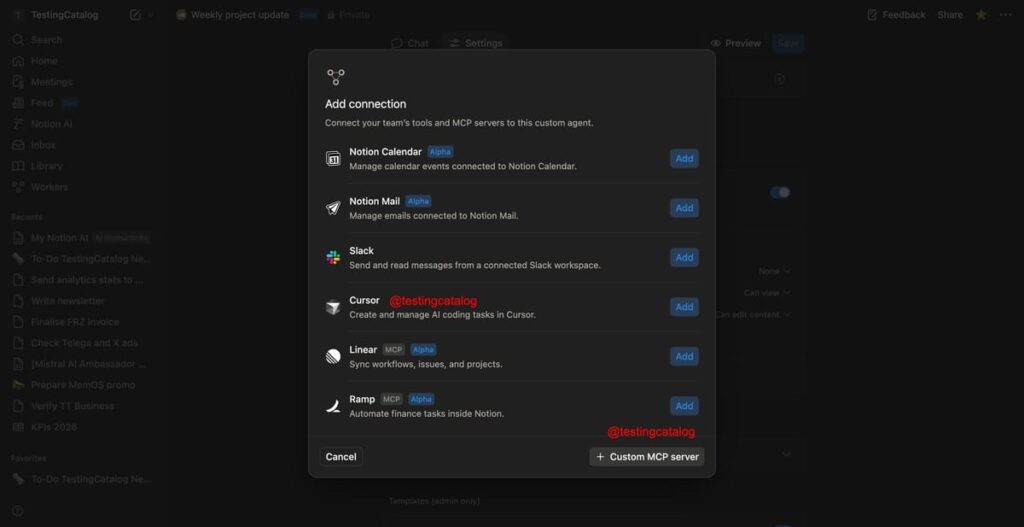
With your flowchart in hand and accounts configured, it’s time to deploy the automation. For instance, if you wish to automate calendar invites through Notion, set up a custom agent that integrates with Notion Calendar and Slack. The inputs to define might include specific keywords that trigger reminders or updates, such as “meeting request,” followed by date and time. Expected outcomes will show automated responses in Slack, confirming receipt of the invites.
Testing your automation is critical. Begin with a small dataset to ensure the automation behaves as expected. Introduce inputs one at a time and monitor outputs in real time. If you discover discrepancies, revisit your configuration and flow to identify the point of failure. For example, if invited participants are not receiving notifications as intended, ensure that the correct channels and keywords are set within the custom agent.
Monitoring your automation should occur continuously after deployment. Use built-in analytics features to observe how often triggers activate, tie in metrics like response times, and evaluate the overall effectiveness. Regularly review logs for errors or failures. An effective automation system ought to provide alerts when processes do not execute as expected, allowing immediate corrective action.
Error handling is another vital aspect. Implement fallback mechanisms, such as email notifications, when the automation fails. This approach ensures that your team is informed promptly and can intervene to prevent disruption. For instance, if a calendar sync goes awry, your team should receive a notification outlining the incident and steps to remedy it.
Cost control often worries small to mid-sized businesses. To budget effectively for automation, consider upfront costs like platform subscriptions and ongoing expenses such as API calls and data storage. Estimate operational ROI by calculating time saved versus costs incurred over a defined period. For example, if automating certain tasks saves 10 hours per week, multiplying that by hourly wages gives a clearer picture of financial benefits.
When implementing any automation, it’s critical to consider security, data retention, and privacy. Ensure that any sensitive information going through your automation adheres to regulatory requirements like GDPR. This means setting up data encryption and limiting access to authorized personnel only. It’s also wise to have a policy for data retention that aligns with industry standards—retain data only as long as absolutely necessary to minimize privacy risks.
Vendor lock-in is a concern that can affect your flexibility and scalability in the long term. Aim for an automation solution that utilizes open standards, making it easier to transition to another platform if needed. Always assess potential partners regarding their data migration policies and commitment to customer support to ensure you have the freedom to evolve your automation strategy without restrictions.
Ongoing maintenance is another aspect to keep in mind. Regularly revisit your automation processes to add or remove steps as necessary, especially as your business needs change. Schedule quarterly audits to assess performance, compatibility with other tools, and compliance with security protocols. This proactive approach will help manage the longevity and effectiveness of your AI-driven automation strategies.
Finally, consider the broader implications while implementing automation solutions. They represent not merely a technological upgrade but a potential shift in organizational culture. Employees might require training to adjust to the new systems, which can enhance their productivity accordingly and foster a more innovative work environment.
FlowMind AI Insight: Navigating the complexities of AI-powered automation requires keen attention to detail and ongoing evaluation. By following a structured approach to implementation that prioritizes monitoring, security, and cost control, your organization can leverage advanced technologies for significant operational improvements.
Original article: Read here
2026-01-19 13:57:00