
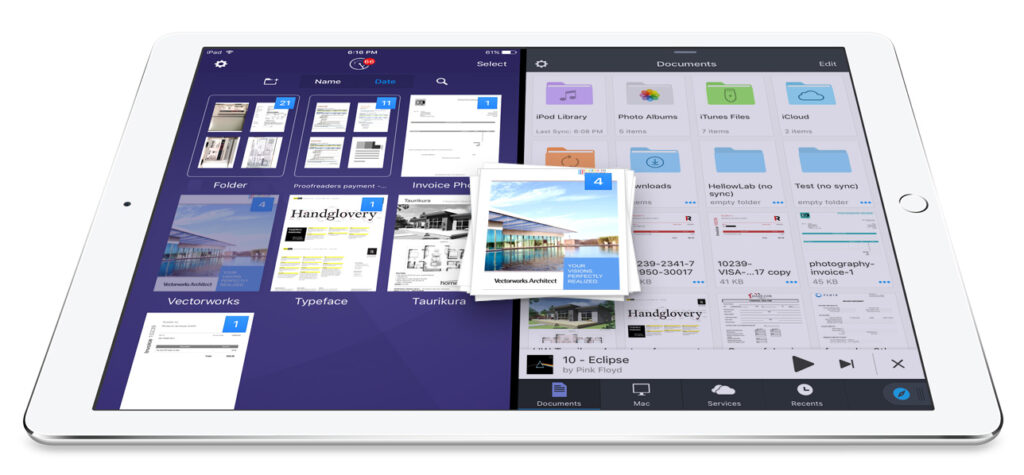
In the realm of productivity apps, Readdle has made a noteworthy advancement by leveraging iPad’s split-screen feature across its suite of applications. This innovative move not only enhances file management but also has potential implications for businesses seeking more efficient workflows. In this analysis, we will compare Readdle’s applications, particularly their drag-and-drop functionality, with another prominent tool for small to medium-sized businesses (SMBs): Microsoft Office 365.
Readdle’s suite includes apps such as Scanner Pro, PDF Expert, Spark, and Documents. The integration of split-screen multitasking is designed to create a seamless ecosystem that allows users to drag files between applications effortlessly. For example, a user can scan documents with Scanner Pro, then drag them directly into an email in Spark. This fluidity is a significant advantage, especially for SMBs that rely heavily on document management and communication.
On the other hand, Microsoft Office 365 offers a comprehensive productivity suite that supports collaboration through tools like Word, Excel, and SharePoint. Office 365 remains popular due to its extensive features, including real-time editing, robust security protocols, and cloud storage solutions. However, the integration between different applications is not as intuitive as Readdle’s ecosystem, which could be a limiting factor for users constantly switching contexts.
Features are pivotal when evaluating SMB tools. Readdle’s offerings excel in user experience and tailor-made functions for mobile and tablet users, capitalizing on the iPad’s hardware capabilities. Conversely, Office 365 shines with its comprehensive feature set across desktop and mobile interfaces, allowing for flexibility in workflows regardless of a user’s operating system. While both suites provide adequate capabilities for document editing and email management, Readdle’s focus on iOS-specific functionalities offers a targeted approach.
Reliability is another important metric. Readdle has built a reputation for consistency and effective performance, with millions of downloads and active users validating its credibility. However, the integration of cloud services might occasionally encounter syncing issues, which can disrupt workflows. Microsoft Office 365, known for its stable infrastructure, usually mitigates these issues through robust cloud solutions with redundant backups, making it a reliable choice for SMBs that require uptime and stability.
Pricing differentiates the two offerings markedly. Readdle’s apps typically operate on a pay-per-app model, meaning SMBs pay only for what they use. This can lead to cost savings for businesses that do not require an entire suite of applications. Microsoft Office 365, in contrast, requires a subscription, encompassing all its tools and storage, making it potentially more costly for companies that find themselves using only a fraction of the product capabilities.
When discussing integrations, Readdle’s apps connect primarily within its own ecosystem, making the transition between them seamless. However, they do have limitations when interfacing with third-party applications. In contrast, Office 365 integrates with countless applications across many platforms, enhancing data flow and collaboration. For SMBs that use a variety of tools, Microsoft Office 365 presents a more extensive integration landscape, which can be critical for maintaining productivity.
Support is another defining aspect. Readdle offers customer support primarily through its website and forums. While they provide necessary assistance, the lack of 24/7 support can be a drawback for businesses operating outside typical hours. Microsoft Office 365 provides round-the-clock support through various channels, which could be a game-changer for SMBs that need immediate assistance.
In a migration scenario, moving from standalone applications to a comprehensive tool like Readdle can involve several steps. First, businesses should conduct an inventory of the current document management processes, identifying key pain points. Next, a low-risk pilot involving a single department could help gauge user experience and integration capabilities. Employees could begin using applications like Scanner Pro and Spark to test the waters before full-scale implementation, allowing room for adjustments based on initial feedback.
As for a total cost of ownership (TCO) and expected return on investment (ROI), Readdle’s modular pricing allows businesses to control expenses effectively. SMBs could anticipate a reduced TCO, as they only pay for the applications they actively use. Over three to six months, the anticipated ROI could materialize through increased productivity due to improved workflows. Conversely, with Office 365, the initial investment might be larger, but businesses can experience more comprehensive collaborative benefits that may lead to greater long-term efficiency.
FlowMind AI Insight: Choosing between Readdle’s specialized productivity suite and Microsoft Office 365 hinges on a company’s specific needs. Readdle may appeal to firms keen on maximizing iPad capabilities and looking for a pay-as-you-go model, while Microsoft Office 365 stands out for businesses requiring multifaceted productivity tools with robust support and integration features. Evaluating these options according to organizational goals and user habits can significantly impact business outcomes and productivity levels.
Original article: Read here
2017-05-25 07:00:00