
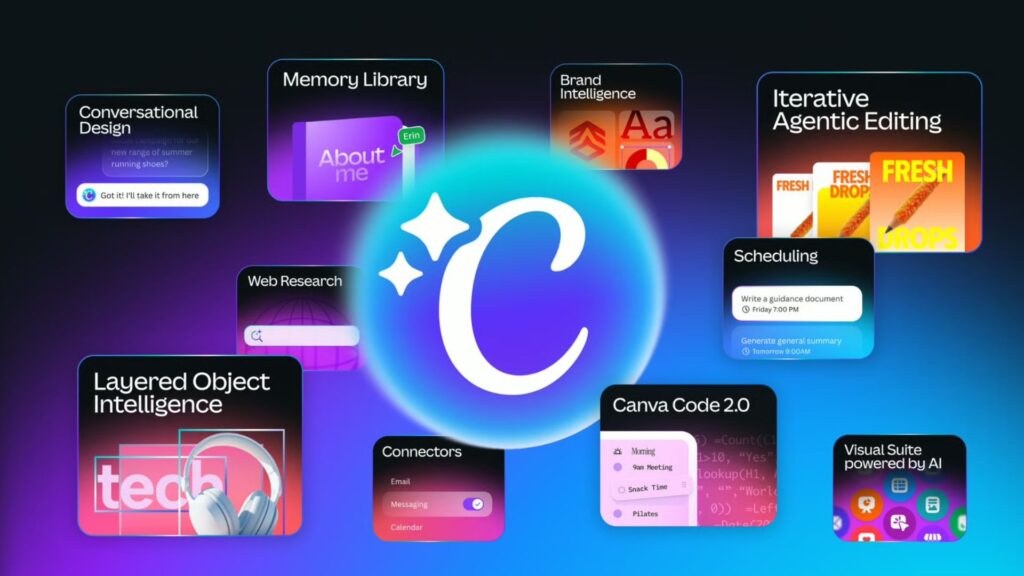
Canva’s recent AI 2.0 update is designed to revolutionize the way small and medium-sized businesses (SMBs) approach design. The traditional tools of design are increasingly giving way to intelligent, prompt-driven interfaces that allow users to create content by simply describing their vision. This shift is particularly noteworthy in the realm of design, where time and resource constraints often limit the capabilities of smaller businesses. By enabling users to generate complete campaigns through text prompts, Canva significantly reduces manual adjustments, allowing for a more efficient workflow.
The core of Canva’s update is its new conversational interface, which consolidates various design features into a single platform. For instance, a user can type a command like “create a summer launch campaign” and receive a comprehensive set of design assets tailored to their specifications. This holistic approach minimizes the fragmentation often seen in design processes, where users typically jump between tools and features.
In comparison to Adobe’s similar moves toward prompt-based editing, Canva offers a more intuitive experience for those without a design background. While Adobe also provides powerful design tools, it often comes with a steeper learning curve and higher complexity, making Canva the better choice for SMBs seeking straightforward design solutions. This user-friendliness is critical for smaller companies that may not have dedicated design teams.
Reliability is another significant aspect where Canva shines. Its AI functionality integrates an orchestration layer that allows its various models to work collaboratively throughout the creative process. In contrast, some automation tools may struggle with cohesiveness, leading to incomplete or inconsistent outputs. Canva’s approach ensures users can rely on the platform to handle the initial heavy lifting, allowing them to focus on refinements instead of starting from scratch.
Pricing is a crucial factor for SMBs evaluating which tool to adopt. Canva offers a free tier with limited functionalities along with a Pro version priced at approximately $12.99 per user per month, which enables enhanced capabilities and access to premium content. This pricing structure makes it an economically viable option for small businesses looking to maximize their design output without breaking the bank. Conversely, Adobe’s offerings generally start at higher price points, such as $20.99 per user per month for standalone applications like Adobe Photoshop or Illustrator. This higher cost may deter smaller enterprises where budget constraints are a primary concern.
Integrations also play an essential role in the decision-making process for SMBs. Canva allows seamless integration with popular apps like Slack, Google Drive, and Gmail. This connected ecosystem simplifies the user experience, allowing them to pull in content without moving between platforms. Adobe also offers integrations, but often they lack the same level of fluidity, requiring additional steps to manage assets across different applications.
When considering limits and capabilities, it’s essential to note that Canva’s recent updates introduce features like object-based AI editing and persistent memory, which adjusts to user preferences over time. However, these features are still evolving. Adobe’s offerings might provide more advanced editing options with tools like Photoshop’s content-aware fill, but they require a higher skill level to utilize effectively. For SMBs that may not have a designated design expert, Canva presents a less intimidating environment.
When implementing such a platform, SMBs should consider a low-risk pilot to facilitate a smooth transition. One effective approach might involve selecting a single team or department to trial the tool over a month. This allows for real-time feedback, adjustment, and training, minimizing disruption to day-to-day operations. Migration steps should include clear communication with the team about the pilot’s purpose and benefits, followed by comprehensive training sessions.
Additionally, businesses should conduct a total cost of ownership analysis. This encompasses the cost of both the tools and the time invested by employees as they learn to use them effectively. For example, if an SMB invests $12.99 per month for a Canva Pro account and estimates an additional 10 hours of employee time over three months for training and production, the total cost would be around $40. This investment could yield significant returns, especially if it enables the business to produce marketing materials that generate increased customer engagement and sales, potentially leading to a return on investment (ROI) that may be seen as early as three to six months.
Ultimately, a streamlined design process powered by AI can significantly enhance operational efficiency in SMBs. It not only alleviates the pressure on marketing teams but also empowers them to explore creative avenues that may have seemed infeasible before the implementation of such technology.
FlowMind AI Insight: Embracing AI-driven design tools like Canva can streamline workflows, enhance creativity, and deliver measurable returns, making them invaluable assets for SMBs navigating the competitive market landscape.
Original article: Read here
2026-04-18 09:08:00